I’m a big fan of Gregor Hohpe’s work. I recently read his book Platform Strategy, which explores a strategic and systems-thinking approach to building and scaling digital platforms.
One of the chapters I particularly enjoyed focuses on assessing platform quality and how effectively you’re utilising the platform’s capabilities. In this post, I’m applying some of the criteria Gregor outlines to evaluate how you’re using ServiceNow as a platform.
In CSM, Modelling sold product, install base items, product models, and integrating them into CMDB may be a complicated activity, so what I’m trying to accomplish here is to reflect on how to do it properly.
In this article, I will work with AD Services, a provider of ITSM SaaS.
let’s start with how that SaaS provider models their SaaS product in the CMDB.
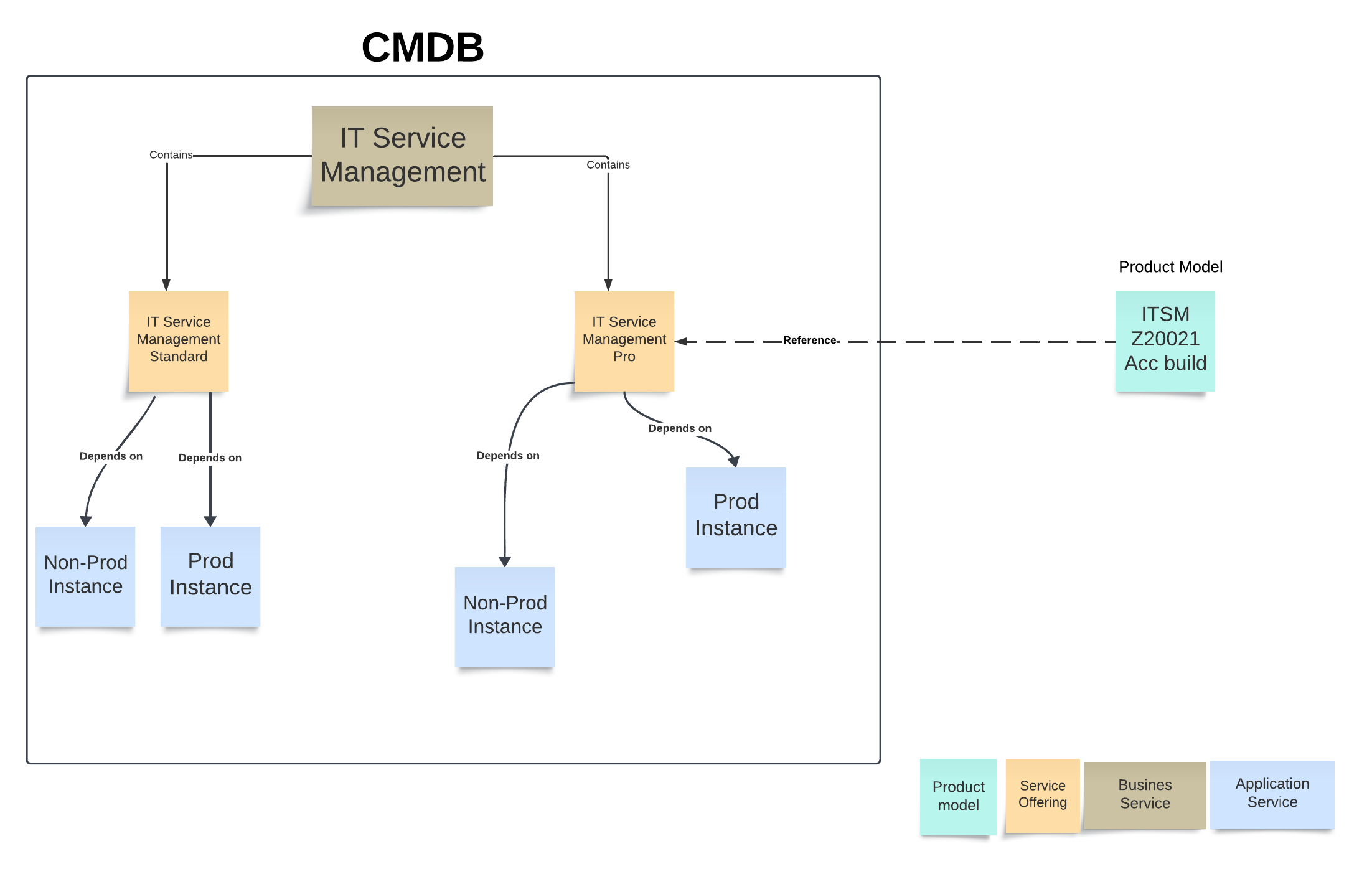
Our SaaS provider offers two IT service management services: Standard and Pro. Every solution depends on two application services: production environment and non-production environment. Our SaaS supplier sells just one product model, the ITSM Z20021 Acc build.
Here’s how the CMDB model looks like
AD Services sold its ITSM Pro SaaS solution to Star Tech Services and provisioned two instances for them.
Star Tech Services has launched the SaaS solution and we want to enable AD Services to support Star Tech Services cases.
let’s review what we have done so far
We created a Product model named ITSM Z20021 Acc build in cmdb_model table
we created one service in cmdb_ci_service
we created two service offerings(PRO and Standard) both of them has the same model ID ITSM Z20021 Acc build
We created two application services for Star Tech Services in cmdb_ci_service_auto
all relationships between CMDB classes are aligned with CSDM
Let’s design a sold product for Star Tech Services. But first, what is the sold product? According to ServiceNow docs, a record is used to track products or services sold to an account or consumer.
Since Star Tech Services purchased the ITSM Z20021 Acc build, we only need one sold product.
We will click on the Sold product module and hit new, populating the following.
Name
Product
Account
Contact
once we click on Save, the service offering field will automatically populated
Now we’ve created the sold product, which is linked to the service offering and product model. We need to put together an install-based item. According to the ServiceNow documentation, an install base item represents a product instance that has been configured for a customer. Therefore, each application service requires a separate install base item for the PROD and non-PROD instances.
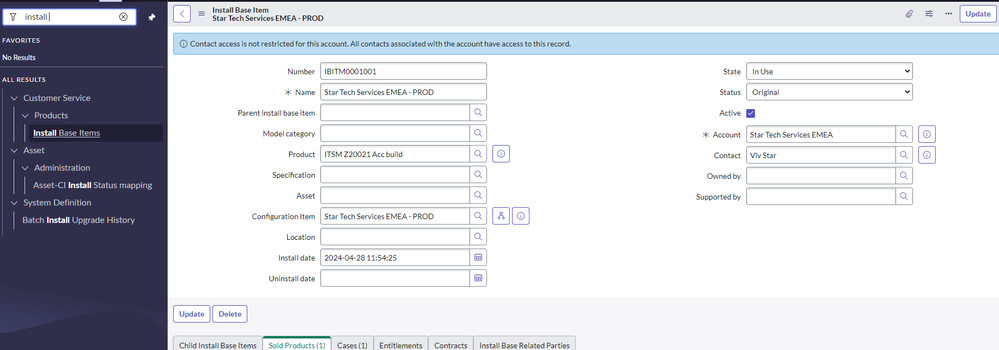
We will click on the Install-based item module and hit new, populating the following.
Name
Product
CI
Account
Contact
After creating an install-based item record, scroll down to the sold product related list and click edit to connect the sold product to the install-based item.
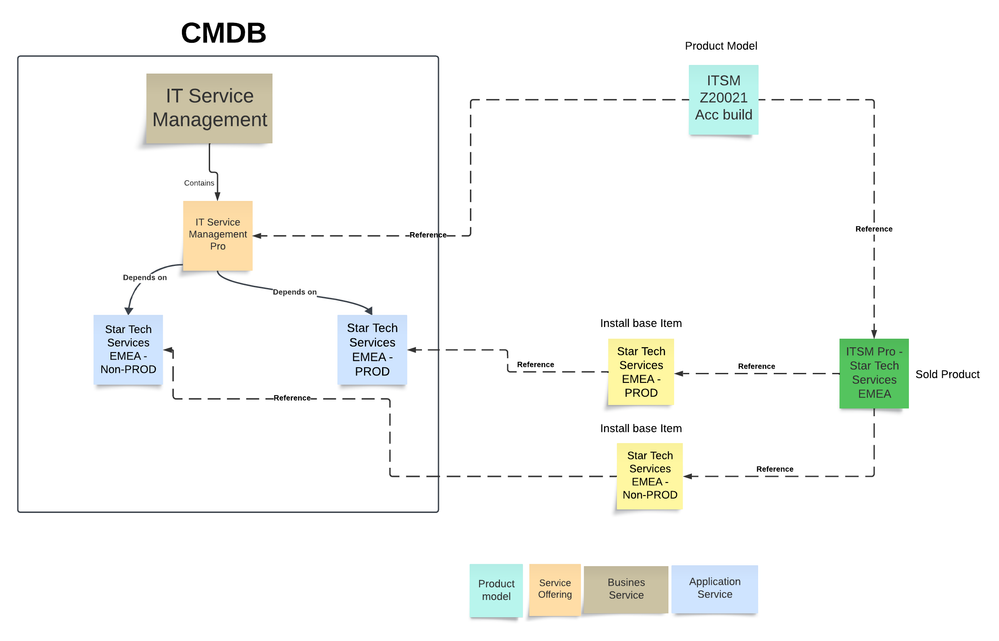
Here’s my final model of how CMDB, Sold product, and install base item interact.
I’ve been fortunate to work with ServiceNow customers for the past 11 years. Throughout this period, I’ve seen organisations fall into two camps:
– those who use ServiceNow as a tool.
– those who use ServiceNow as a platform.
There’s nothing inherently wrong with using ServiceNow as a tool – it can address specific needs and deliver tangible benefits. However, treating it exclusively as a tool reduces its worth as an organisational strategic asset.
This approach often raises questions about ROI and the total cost of ownership.
but what Is the difference between a tool and a platform?
Service Operations Workspace provides much simpler and intuitive view than the classical UI.
as way to encourage users to adopt Service Operations Workspace in their day to day operation, you can create a simple UI action that can take ITIL users from the classical UI to the Service Operations Workspace with a single click.
here is how you can do it
Navigate to System Definition >> UI Action
Click ‘New’ to create new UI Action
Set up the UI Action as per screenshot below
Add script below to the Script field
function openSOWorkspace() {

	g_navigation.openPopup("/now/sow/record/"+ g_form.getTableName() +"/" + g_form.getUniqueValue());
}
You can download the UI Action from ServiceNow Share
I’ve been using GlideRecord for the past nine years. The time has come to move on from GlideRecord and experiment with GlideQuery. This post will show you how to run a query using GlideQuery.
As part of the GRC implementation, organization ABC implements a bunch of control. All of them obviously need to be continuously monitored. The team uses indicators to constantly monitor all of the ABC controls.
During implementation, the GRC team noticed that it is challenging to use the basic indicator type to monitor all control, especially control 123.
We can learn so many things from software development and architecture principles. In software development, writing clean code is crucial; if you are a software developer, you would 100% appreciate the importance of clean code.
You might argue that the word ‘clean’ is a bit arbitrary here and what makes a code clean? Another thing you might say is that ServiceNow is a kind of low-code or no-code platform, so how is this applicable? Let us look at the tenets of clean code and see how we can apply this to our ServiceNow implementation.
The new world doesn’t reward architects who draw diagrams while sitting in the ivory tower. It has a lot in store, though, for hands-on innvovation drivers and change agents
Gregor Hohpe
I completed Gregor Hohpe’s book The Software Architect Elevator: Redefining the Architect role.
I did enjoy the book. It’s a great read. I would strongly advise anyone interested in system architecture to pick up this book.
Here are eight lessons I learn from Gregor Hohpe’s book:
A few days ago I saw a question on the ServiceNow community about how inheritance works in a script include so I thought to write a short article about that.
In Script include we can write a function or we can create a class. In JavaScript, class is an object, an object can access properties and functions from another object, this we call Inheritance
Inheritance is a great way to create a parent/child hierarchy of classes. A good use case for inheritance is when you wish to indicate that one object is mostly similar to another, but with some variations.
ServiceNow introduces Export Events [isc_export_event]table. The table stores export transactions that are performed by any user. The table gives information about what data is being exported, who exported the data, and when the data is being exported.







 I'm Ahmed